
Checkout broke at 2:10 a.m.
You knew by 2:15.
StoreOnCall tries to buy from your Magento store every 15 minutes and checks it from the inside every 5: payments, cron, indexes and orders.StoreOnCall tries to buy from your BigCommerce store every 15 minutes and watches your orders and payment methods every 5, through a read-only app. When customers cannot buy, you hear it first, in plain words, with the money at risk.
Not sure which platform? Paste the address anyway: the scan finds out by itself. Prefer to start watching now? Start a free 14-day trial, no card.
- Test shopper tries to buy
- Fails twice at payment
- Owner and developer alerted
- Acknowledged and fixed
 Test shopper, run every 15 minutes
- Open a product page
- Add to cart
- Shipping options appear
- Reach the payment step
Example alert. Figures are illustrative.
01 / What it does
Uptime tools ask "is the site up?" StoreOnCall asks "can people buy?"
Most expensive Magento problems keep every page loading: a payment method fails, cron stops, prices go stale.On BigCommerce the servers are looked after for you, but checkout still breaks: a gateway starts declining, shipping disappears, a theme or app change stops the cart. StoreOnCall catches them, three ways.
Tries to buy
Every 15 minutes a test shopper goes through checkout to the payment step, then stops. If customers would get stuck, it gets stuck first.
Watches the inside
A read-only plugin reports on orders, payment methods, cron, indexes, queues and order emails, and compares orders with what is normal for that hour.
A read-only app reads your orders every 5 minutes, compares them with what is normal for that hour, and watches each payment method on its own.
Tells the right person
Owners hear what broke and what it costs. Developers get where to look. One click to acknowledge, or it escalates.
02 / Problems we catch
Real Magento problems, and how StoreOnCall catches each oneReal BigCommerce problems, and how StoreOnCall catches each one
A payment module breaks after an update
Customers pick the method, the payment never completes, orders pile up in pending payment.
How we catch it: each payment method is watched on its own; when most of its recent orders are stuck or cancelled, you get an alert naming the method.
Cron stops after a server change
Prices, stock, search and order emails quietly stop updating, while every page still loads.
How we catch it: the plugin reports through cron every 5 minutes, so 20 minutes of silence means cron has stopped. Failed, skipped and stuck jobs are named too.
Add to cart fails after a deployment
A stale page cache or a broken extension stops the cart, but the product page looks perfect.
How we catch it: the test shopper adds to cart every 15 minutes, checks twice, and the alert names the deployment just before as the likely cause.
Indexes fall out of date
Shoppers see old prices, or buy products you no longer have in stock.
How we catch it: every index and its backlog is checked, and price, stock and search indexes are treated as the most serious.
Order emails stop going out
Customers think the order failed, then call or order again.
How we catch it: with asynchronous sending on, unsent order confirmations are counted and alerted.
The full page cache is switched off
Often left off after debugging; the store slows down for everyone.
How we catch it: cache status comes in with every report, and a disabled page cache is flagged as high priority.
A payment gateway starts declining
Expired credentials or a gateway change, and orders end up Declined or Awaiting Payment.
How we catch it: each payment method is watched on its own; when most of its recent orders are declined, awaiting payment or cancelled, you get an alert naming the method.
Shipping disappears at checkout
A shipping zone or carrier setting changes, and customers in a region see no way to ship.
How we catch it: the test shopper enters a test address in your chosen country every 15 minutes and checks shipping options appear.
A theme or app change breaks the cart
A script or app update stops add to cart or checkout, while the store looks fine.
How we catch it: the test shopper adds a product to a cart and opens checkout every 15 minutes, checking twice before it alerts.
No way to pay at checkout
A payment method is switched off or misconfigured, and checkout offers nothing to pay with.
How we catch it: the test shopper checks payment methods are offered at checkout, then deletes its cart without paying.
Orders quietly drop
Something breaks that no single check sees, and orders fall well below normal.
How we catch it: orders are compared with what is normal for that hour and day, learned from your past orders on day one.
The app loses access
If StoreOnCall can no longer read your orders, nothing is being watched.
How we catch it: 20 minutes without a successful read raises an alert; removing the app on purpose stops quietly.
More about StoreOnCall for MagentoMore about StoreOnCall for BigCommerce
03 / How you connect
A read-only plugin, installed by your developer in 10 minutesA read-only app, installed in one click
Same alerts, same dashboard, same reports on both platforms. Only the way in is different.
Magento and Adobe Commerce
A read-only plugin
A developer installs it in about 10 minutes. The setup guide walks them through it, or emails them the exact steps.
- Test shopper every 15 minutes
- Orders against normal, payment methods
- Cron, indexes, queues, caches and order emails
- Deployments and extension changes named as likely causes
BigCommerce early access
A read-only app
Install it in one click from your BigCommerce control panel. No code, no developer needed.
- Test shopper every 15 minutes
- Orders against normal, payment methods
- BigCommerce runs the servers for you, so there is less that can quietly break
- Same alerts, reports, API and agency features
On BigCommerce instead? On Magento or Adobe Commerce instead?
04 / What is it worth?
What does a broken checkout cost you?
Type your monthly online revenue. We work out what an hour, a night and a weekend of "nobody noticed" costs.
Average sales spread evenly over the month. Your busiest hours cost more. StoreOnCall's Store plan is $149 a month.
Check my store now05 / One bad night
The same problem, two very different mornings
A payment step fails after a late deployment. Times are illustrative.
Without StoreOnCall
- A deployment breaks the payment step. Every page still loads.
- The uptime monitor checks the home page: all green.
- A customer emails: "I could not pay."
- The developer finds the cause and rolls back.
- More than 8 hours of lost orders.
With StoreOnCall
- A deployment breaks the payment step.
- The test shopper fails at payment, checks again, fails again.
- Owner and on-call developer are alerted, with the deployment named as the likely cause.
- One click to acknowledge. The developer rolls back.
- Minutes of lost orders, not a morning.
06 / How it works
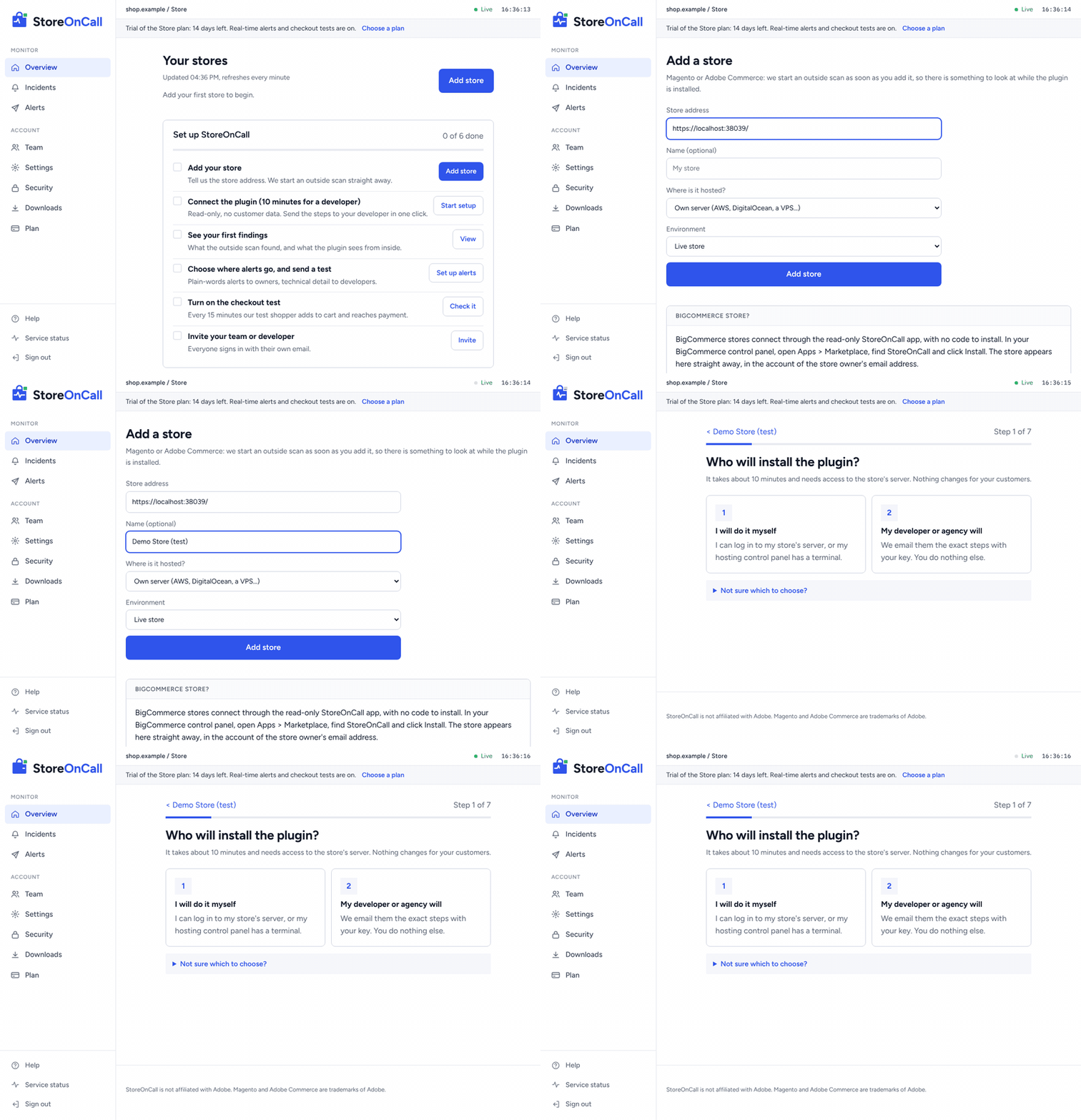
Set up in an afternoon. Then forget about it.
These are recordings of the real dashboard with a test store. Pick a step, or let it play.
07 / One alert, two readers
Plain words for the owner. The detail for the developer.
Every alert is written twice, so nobody has to translate at 2 a.m.
Example alert. Figures are illustrative.
Our test shopper could not pay on your store (checked twice). Customers are probably hitting the same problem right now.
About $860 of sales at risk for every hour this lasts.
What to do: try to buy something on your phone, and forward this alert to your developer. It says which step failed.
Checkout test failed at "pay": payment step returned HTTP 500 (2 of 2 tries)
Likely cause: deployment at 02:08 (static version changed)
Check: var/log/exception.log, payment module credentials,
       provider status page
Recent changes: Vendor_Payment 3.4.1 to 3.5.0
Checkout test: no payment methods offered (2 of 2 tries)
Test address: Auckland, NZ. Cart deleted after the test.
Check: Settings > Payments in BigCommerce, gateway
credentials, provider status page08 / What we check
Everything between a shopper and an order
Can customers buy?
- Test purchase every 15 minutes
- Orders compared with your normal for that hour
- Failing payment methods
Background jobs
- Cron running, failing, skipped or stuck
- Message queues
- Order emails not going out
Prices, stock and search
- Indexes out of date
- Index updates piling up
Speed
- Full page cache switched off
- Caches needing a refresh
Can customers buy?
- Test shopper every 15 minutes: cart, checkout, shipping, payment methods
- Checked twice before it alerts
Orders and payments
- Orders compared with your normal for that hour
- Each payment method watched on its own
The connection
- Alert if we cannot read your store for 20 minutes
- BigCommerce runs the servers, so there is no cron or cache to watch
09 / Who it is for
Built for everyone a broken store keeps awake
Store owners
Know your store is selling without checking it yourself. Plain-words alerts with the money at risk, and a monthly reliability report.
Start a free trialDevelopers
The failing step, recent deployments and extension changes, failed cron jobs and stuck queues, in the alert.The failing checkout step, the test address used and the payment methods affected, in the alert. Every failure checked twice.
See the exact rulesAgencies
Every client store on one screen, your name on alerts and reports, bulk scans for prospects, and 25% of what referred brands pay.
For agencies10 / For agencies
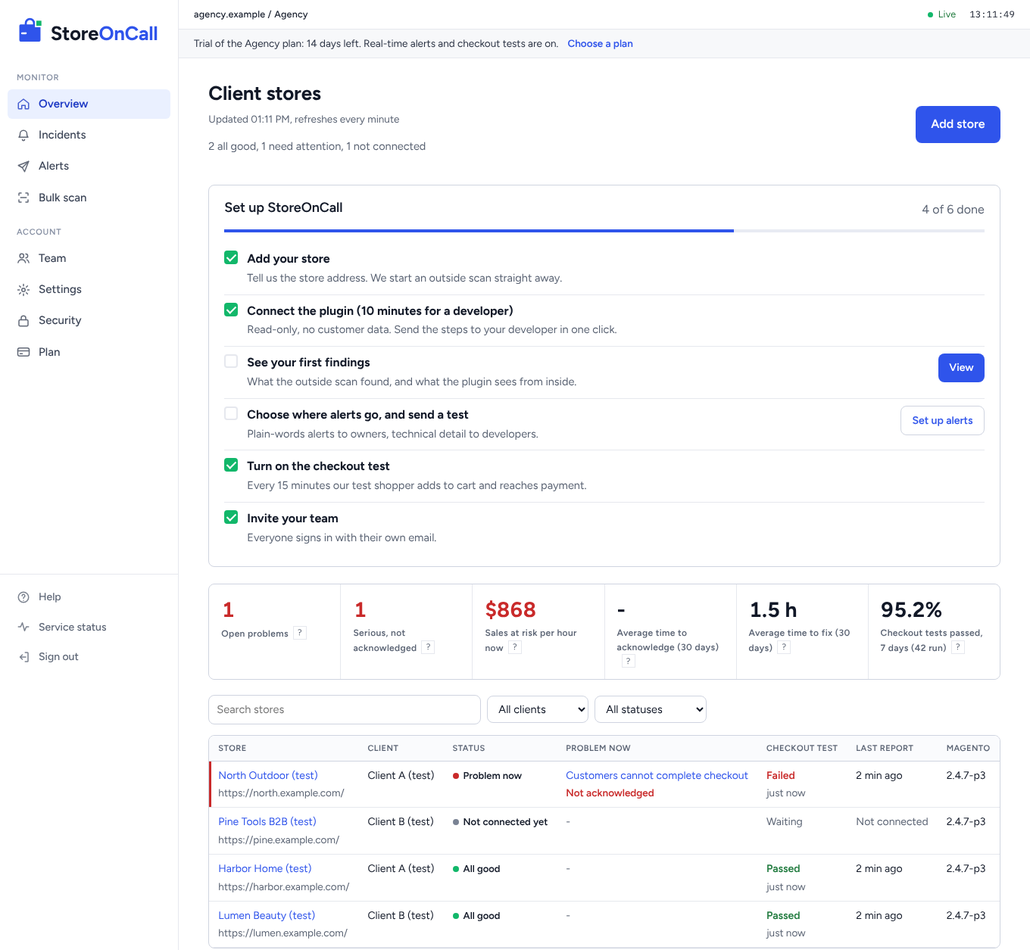
Every client store on one screen. Your name on the reports.
- Portfolio of every client store, problems first, grouped by client
- Bulk scan up to 50 stores at once: clients or prospects
- Your agency name on alerts and monthly reliability reports
- Acknowledge, assign, notes, escalation and an audit log
- Partner programme: earn 25% of what referred brands pay, for as long as they stay
11 / Pricing
Simple pricing. 14-day trial, no card.
Every paid plan starts with a free 14-day trial. After it, you stay on the free plan unless you choose one.
Store
$149/month
1 store
- Real-time alerts: email, WhatsApp, Slack, Telegram, webhook
- Checkout test every 15 minutes
- Escalation and audit log
Most complete for brands
Business
$399/month
Up to 5 stores
- Everything in Store
- Monthly reliability reports
- Read-only API, CSV exports
- Office IP allow-list
Agency
$999/month
10 stores, then $79 per store
- Everything in Business
- Client portfolio and bulk scan
- Your name on alerts and reports
- 25% partner share
Prices in US dollars. Taxes and invoices are handled by our payment partner. Cancel any time. Compare every feature.
12 / Security
Read-only. No customer data. Ever.
The plugin only reads, only calls out, and never sends customer data. Run bin/magento storeoncall:preview to see exactly what it would send. How we protect your store.
- Read-only database queries; adds no tables, pages or admin users
- Counts and statuses only: anything that looks like personal data is refused
- Sign-in by single-use link, email on new devices, automatic sign-out
- Every change and sign-in recorded in an audit log
13 / Questions
Questions
I am not technical. Can I still set it up?
Yes. You add your store and choose where alerts go in the dashboard. The plugin needs someone with access to your store's server for about 10 minutes; the setup guide can email them the exact steps with your key filled in.
Which stores does it work with?
Magento Open Source and Adobe Commerce 2.4, self-hosted, on managed hosting or on Adobe Commerce Cloud. BigCommerce stores are in early access, with the checkout test, order and payment checks. The free scan works on both, and tells you which platform a store runs on.
Will the plugin slow my store down?
It runs in the background through Magento's cron every 5 minutes, with a handful of read-only queries. It adds nothing to the pages your customers load.
Will the app slow my store down?
No. It reads your orders through BigCommerce\'s API from our servers; nothing is added to your storefront. The checkout test is one shopper every 15 minutes, and it deletes its cart.
Does the checkout test place orders?
No. It adds a product to the cart, enters a test address and checks that shipping and payment options appear, then stops. There is nothing to cancel or refund.
Will I get false alarms?
Every failure is checked twice, most problems must last a few minutes before we alert, and order drops are judged against your own store's pattern for that hour. If a firewall blocks our test, we say "could not test", never "broken". You can rate every alert, and we use those answers to tune the checks.
Can I stop at any time?
Yes. Cancel the plan and you drop to the free plan. You can download all your data or close the account from the dashboard, and remove the plugin with the steps in the help centre.
14 / Talk to us
Rather talk to a person?
Not sure it fits your store, or want a walkthrough for your agency? Message us on WhatsApp or email, and a person replies.
Chat on WhatsAppEmail hello@storeoncall.com
WhatsApp +91 91806 04521, Monday to Friday, 10 am to 6 pm India time. Email any time.
- A walkthrough of the dashboard on your own store
- Help choosing a plan, or a quote for many stores
- Help for your developer with the install
- Partner programme details for agencies

See what your customers would hit today
The free scan takes a few minutes and needs no sign-up.